How to use live bilingual captions on iPhone
Prepare your languages, follow a conversation in two languages, and review the transcript afterward.
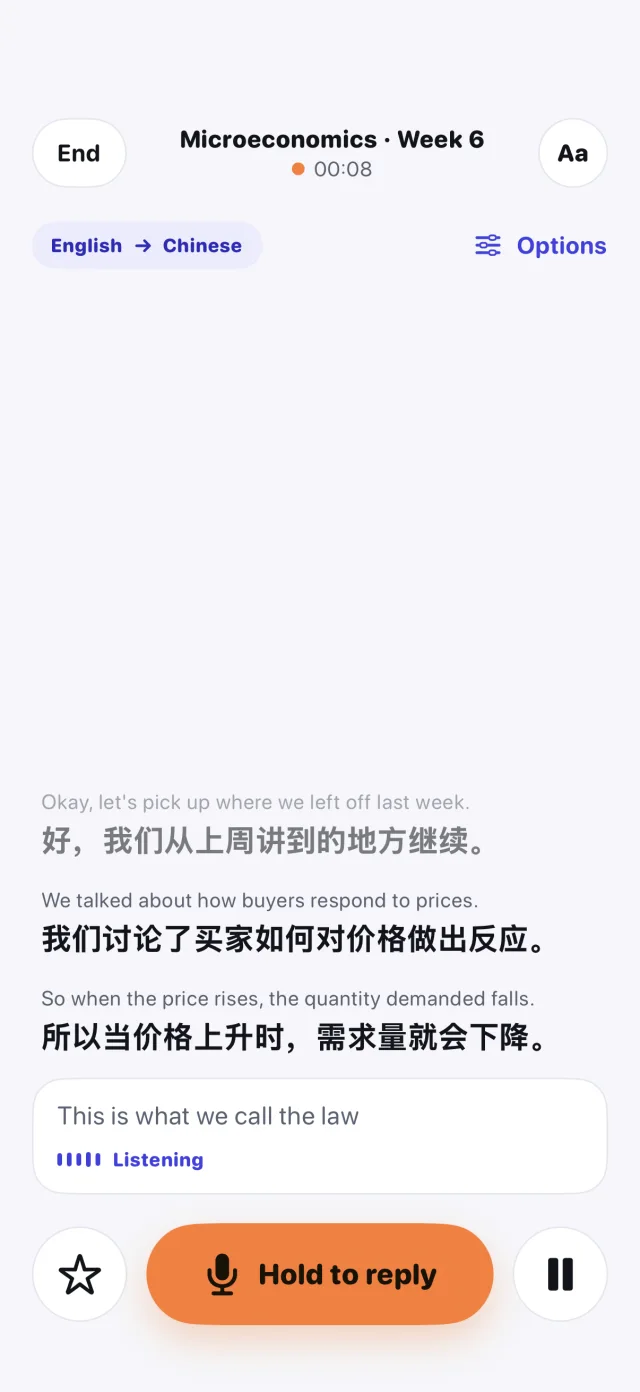
When a conversation moves faster than you can translate, having the original speech and its translation on the same screen makes it easier to follow along and check unfamiliar words.
Prepare your languages while online
Open LingoBox and use its readiness check for your device and language pair. Download the required Apple language resources while connected. Before you leave, try a short session with connectivity turned off if you expect to need offline captions.
Choose a mode for the conversation
- Use Listen when someone else is speaking and you want to follow the original alongside the translation.
- Use Conversation for back-and-forth turns. For two people facing each other, try Face to Face so each person can read their side.
Try a few lines first. Speak in short turns and reduce background noise if possible. Confirm names, numbers, and addresses with the speaker when the translation is unclear.
Review what you heard
Save the session to revisit the text on your device. Ask the other person before saving a conversation. You can star important lines for later lookup. Availability and session limits depend on your setup, so check the product page before relying on it for a long session.